How it works
You decide what to build. Runway builds it.
The thinking stays with you, in a normal Claude Code or Codex session. Once the work is shaped into tickets and you type go, everything after that runs without you. You only come back for a merge that isn't low risk.
- You + your agent
Discover
Talk the problem through. For big, foggy work, map out the decisions first.
wayfinder · grill-me - You + your agent
Prototype
Answer a design question with a throwaway prototype before anything real is built.
prototype - You + your agent
Spec
Turn the conversation into a spec: what done looks like, and how to check it.
to-spec - You type go
Tickets
Your agent breaks the spec into small tickets, each with its risk and acceptance checks. Nothing is filed until you say go.
file-tickets - Runs on its own
Build and check
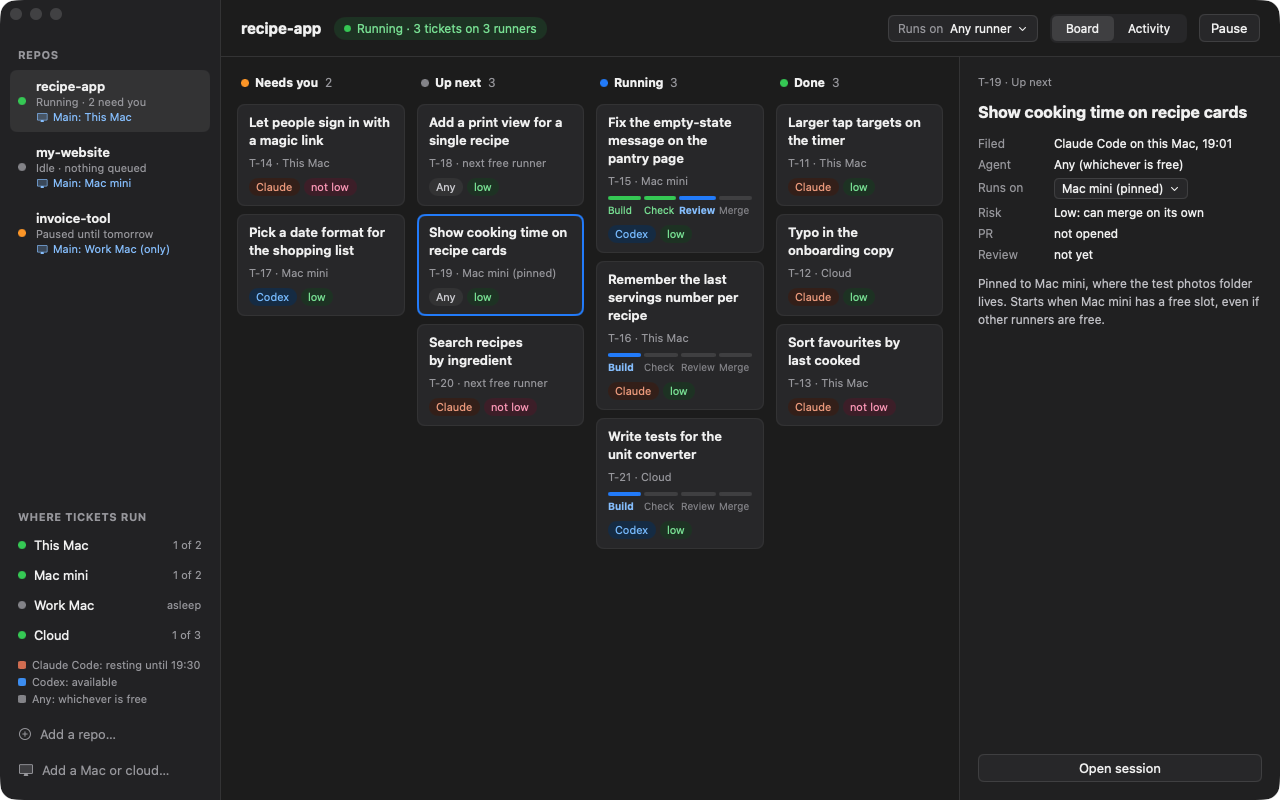
Each ticket runs on a free Mac in its own worktree. Then two fresh sessions review it: one reads the code, and one runs every acceptance check.
Runway app - Runs on its own
Merge
Low-risk work that passes review and checks merges itself. Anything else waits on your board as one question.
runway
If a ticket gets stuck, copy its take-back prompt from the board and finish it with your agent. Then give it back to Runway, mark it done, or drop it.
One subscription is enough
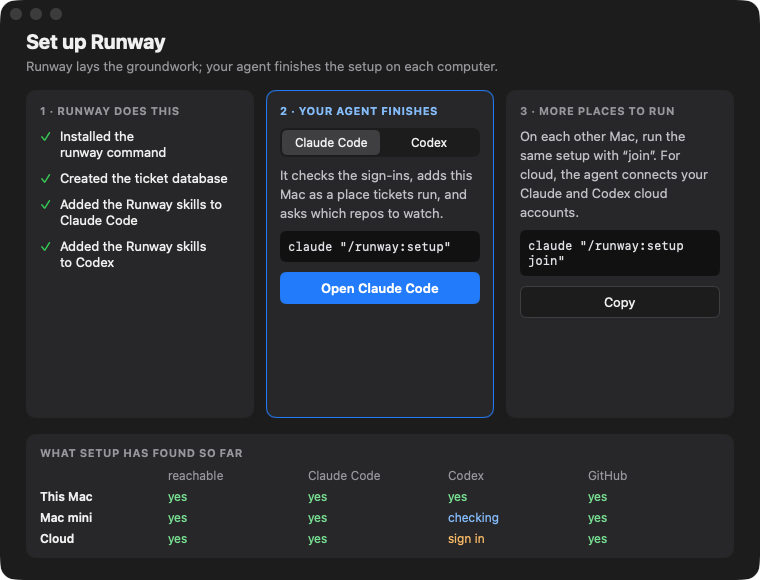
Tickets run with the Claude Code or the Codex you already sign in to. You don't need both, any API keys, or a service in between.
Nothing hosted
One SQLite file on your Mac holds every ticket and run. Specs and code stay in your git repos.
Nothing hidden
The loop runs only while the app is open. No daemons, no launch agents. Close the app and dispatch pauses; runs already started finish.
A gate you can read
Auto-merge needs low risk, a passing review on the exact commit, green checks, and no sensitive paths such as auth, payments, migrations or CI. A reviewer can raise risk, never lower it.
Claude Codex Any
Use whichever one you have. With both, pin a ticket to one agent or let whichever is free take it, and when one hits its usage limit the next tickets go to the other.
Many Macs, one board
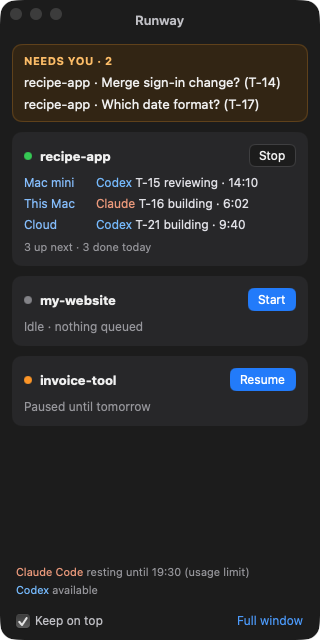
Each repo has a main computer, and a ticket can be pinned to the Mac where its files live. The board shows what runs where.
Know how hands-off it is
A strip on the board shows how many tickets merged without you, how long they took, what they cost, and where the others stopped.
It learns from its stops
When three tickets stop for the same reason in a week, Runway files a retro ticket to fix the cause. Its pull request links every failed run, and it never merges itself.
The app
One look tells you what needs you
A real run
Three tickets, one practice repo
These are the first tickets Runway ran for real, on a small practice repo. They were filed from a session, then built, reviewed and gated with nobody watching.
| Ticket | Built by | Reviewed by | Result |
|---|---|---|---|
| T-1 Count lines · low risk | Claude | Codex pass | Merged by the gate, 80 seconds from filing |
| T-2 Count words · not low | Codex | Claude pass | Waits for you: "Merge PR #2?" |
| T-3 Count characters · low risk | Codex | Claude fail, then pass | Merged by the gate after one retry |
One merged with nobody touching it. One merged after a retry, once a Runway bug it hit was fixed. The third waited because it was marked not low risk when it was shaped, which is the point.
Questions
What people ask first
What does it cost?
Nothing extra. Runway is free, and tickets run on the subscription you already have: Claude Code or Codex, even an entry-level plan. There are no API keys and nothing is billed per run.
Do I need both Claude Code and Codex?
No. Runway works with just one. Every ticket gets two fresh-session reviews, one of the code and one of the acceptance checks, and with one agent both run on it. If you have both, the code review goes to the other agent, which catches a bit more.
Does my code leave my Macs?
Runway itself sends nothing anywhere. Tickets and runs live in one SQLite file on your Mac. Your code goes where it already goes: to GitHub, and to Claude Code and Codex as they work on it.
What stops it merging something bad?
A gate written in code, not a prompt. A ticket merges on its own only when it was marked low risk while it was shaped, both fresh reviews (code and acceptance checks) passed on the exact commit, the checks are green, and it touches no sensitive paths such as auth, payments, migrations or CI. A reviewer can raise the risk but never lower it. Everything else waits for you.
Is this for teams?
No. Runway is for one developer working across their own repos and Macs. There's no Slack bot, no shared cloud and no seats. If you want a hosted factory for a whole engineering team, cloud products such as Warp Factories are built for that.
Do I have to design my own workflow?
No. Runway comes with one: discover, prototype, spec, tickets, then hands-off build, review and merge. Install it and use it as it is. It's built around the open skills Matt Pocock publishes, so you're not inventing a process. If you already work another way, file-tickets can file tickets from any session.
What if I hit my usage limit?
Runway rests that agent until the limit resets, and the ticket goes back in the queue without using up its fix attempt. If you have both agents, the next tickets go to the other one in the meantime.
Where it stands
Early, and honest about it
Runway is a working preview built in the open. Expect rough edges and say so when you hit one.
Feedback
Found a bug? Want something?
Open an issue on GitHub. Once the Runway skills are installed, you can also ask your agent: it drafts the issue with your version and macOS, shows it to you, and files it only when you say so.
/runway:feedback the board froze after I closed the lid